Project Risk Management: How to Identify, Assess and Control Risks
Learn project risk management with practical examples, a sample risk register and simple ways to identify, assess and control risks before they cause delays.
Read insightSet up project management for your small business with 10 practical steps covering project planning, responsibilities, scheduling, risks, software and workflow automation.

Most small businesses run projects without ever calling them projects. A website redesign, a new branch, a client campaign. Each one has deadlines, people and money attached, and each one usually lives in a mix of emails, spreadsheets and WhatsApp messages.
That works until the team grows. Then decisions get lost in chat threads, nobody is sure who owns what, and managers spend their week chasing updates.
You don’t need a project management department to fix this. You need a simple system that shows what needs doing, who is doing it, when it’s due and how you’ll know it’s on track.
This guide explains how to set up project management for a small business, using a practical framework that works across IT, professional services, digital agencies and other growing businesses.
Project management means planning, organising and coordinating work to achieve a specific result within agreed constraints.
A project has a defined purpose and a beginning and an end. Routine business operations continue from day to day.
For example, processing customer orders is an ongoing operation. Setting up a new order management system is a project.
Small businesses commonly run projects such as:
Even smaller projects can run late, exceed their budgets or create confusion between employees and clients.
Project management gives businesses a consistent way to organise this work and respond when things don’t go as expected.
They need structure, but the amount should match the work.
A five-person agency doesn’t need the same reporting procedures as a major engineering project. However, both need clear objectives, agreed responsibilities, realistic schedules and a way to handle problems and changes.
This idea is well established in project management guidance.
The Project Management Institute’s PMBOK Guide discusses adapting project management practices to the project environment. PRINCE2 7 also emphasises tailoring its approach to different projects and organisations.
For small businesses, that means choosing practices that genuinely help people deliver work.
Projects sometimes begin with a request that sounds straightforward:
“We need a new website as soon as possible.”
The team starts designing pages, only to discover later that nobody agreed on the main purpose of the website, what features are required or who has the final say on design decisions.
The same problem happens with software implementations, marketing campaigns and operational improvement projects.
Before starting, write a short project brief that answers six questions:
| Element | Example |
|---|---|
| Objective | Open an online sales channel |
| Deliverables | Website, product catalogue, payment integration and order process |
| Target duration | 8 weeks |
| Budget | £8,000 |
| Project owner | Business owner |
| Project coordinator | Operations manager |
| Success criteria | Website passes agreed tests and is ready to accept customer orders |
The budget and timeline are hypothetical figures used to explain the planning process.
For a straightforward project, a one- or two-page brief may be enough. More complex projects may require a detailed business case, scope statement or requirements document.
The important thing is that everyone understands what has been agreed before significant work begins.
“Launch the new website” is a reasonable project objective, but it is too broad to assign as a single task.
How would you estimate the work? How would you know what has been completed or what is still missing?
A useful technique is the Work Breakdown Structure (WBS).
A WBS divides the project’s total scope into smaller, manageable components organised around what needs to be delivered.
According to PMI’s guidance on Work Breakdown Structures, the WBS focuses on project deliverables and work packages. These work packages can then be used to define activities, estimate resources and develop the schedule.
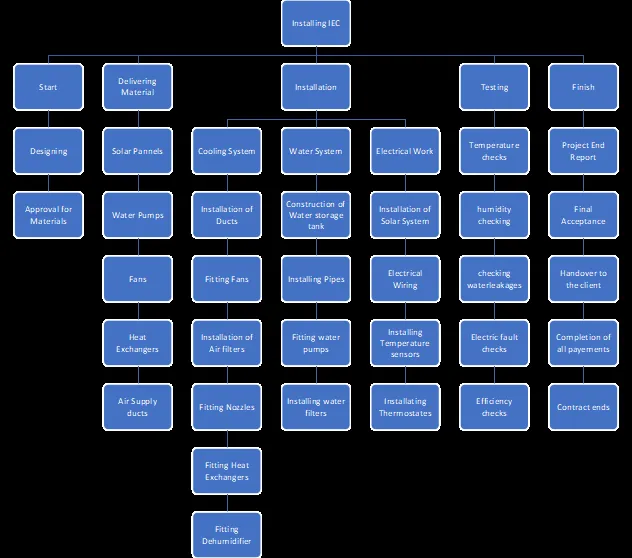
For our online store, the main deliverables might be:
Once these deliverables are identified, the team can break them into activities.
For example, delivering a configured online store may require:
Each activity should have a responsible person, an estimated duration and a clear completion requirement.
Break the work down until someone can reasonably estimate, assign and monitor it.
“Set up the payment gateway and complete test transactions” may be a useful task.
Creating separate tasks for every minor configuration click probably won’t help anyone manage the project.
The detail should reflect the complexity of the work and the team’s needs.
In small businesses, people often handle several responsibilities.
One employee might communicate with clients, coordinate suppliers, review deliverables and prepare reports. That flexibility is useful, but it can also make decision-making confusing.
Imagine a developer completes a website design, but nobody knows whether the account manager, project coordinator or client has authority to approve it.
The work may be ready, yet the project stops moving.
To avoid this, agree on four things for important tasks and decisions:
A RACI matrix can help make these responsibilities clear.
RACI stands for:
| Activity | Business owner | Project coordinator | Developer |
|---|---|---|---|
| Approve project budget | A | R | I |
| Prepare project schedule | C | A/R | C |
| Develop website | I | A | R |
| Approve final launch | A | R | C |
In this example, the business owner has final authority over the budget and launch, while the project coordinator manages the delivery process.
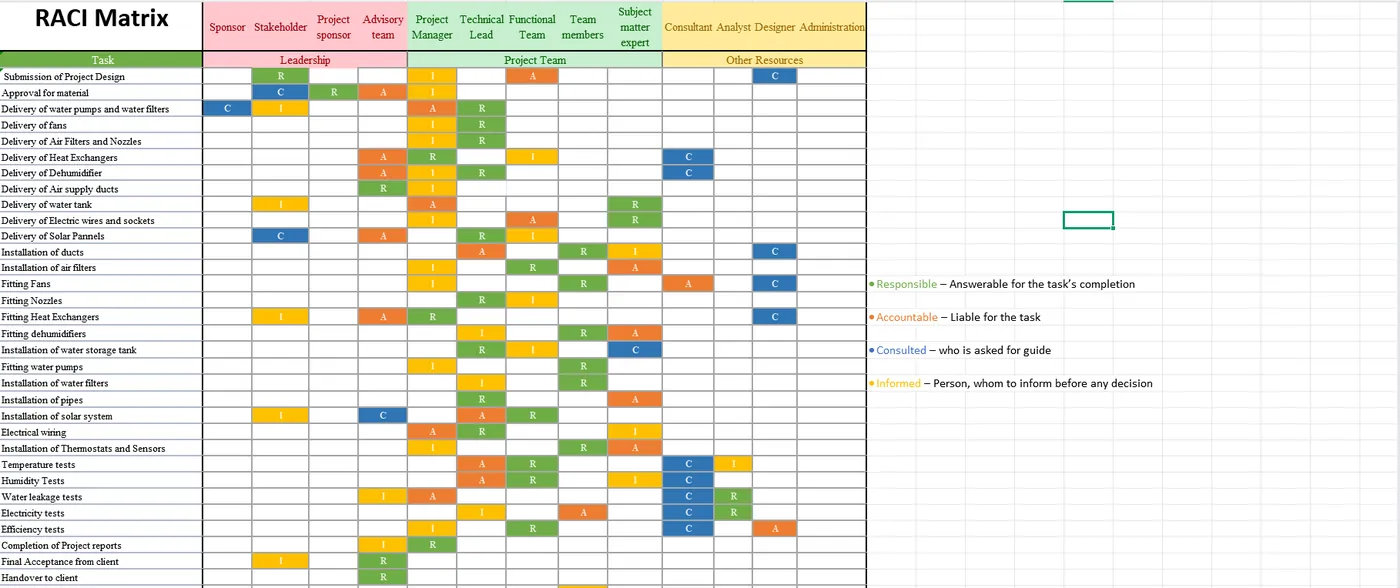
You don’t need a RACI matrix for every minor task. It becomes particularly useful when several departments, external suppliers or clients are involved.
For a detailed explanation, see APM’s resources on project management roles and governance.
Many project deadlines are decided before the work has been properly estimated.
A client wants a website in four weeks, management announces a product launch date, or a business owner expects new software to be implemented by the end of the month.
These dates may be achievable, but somebody needs to check.
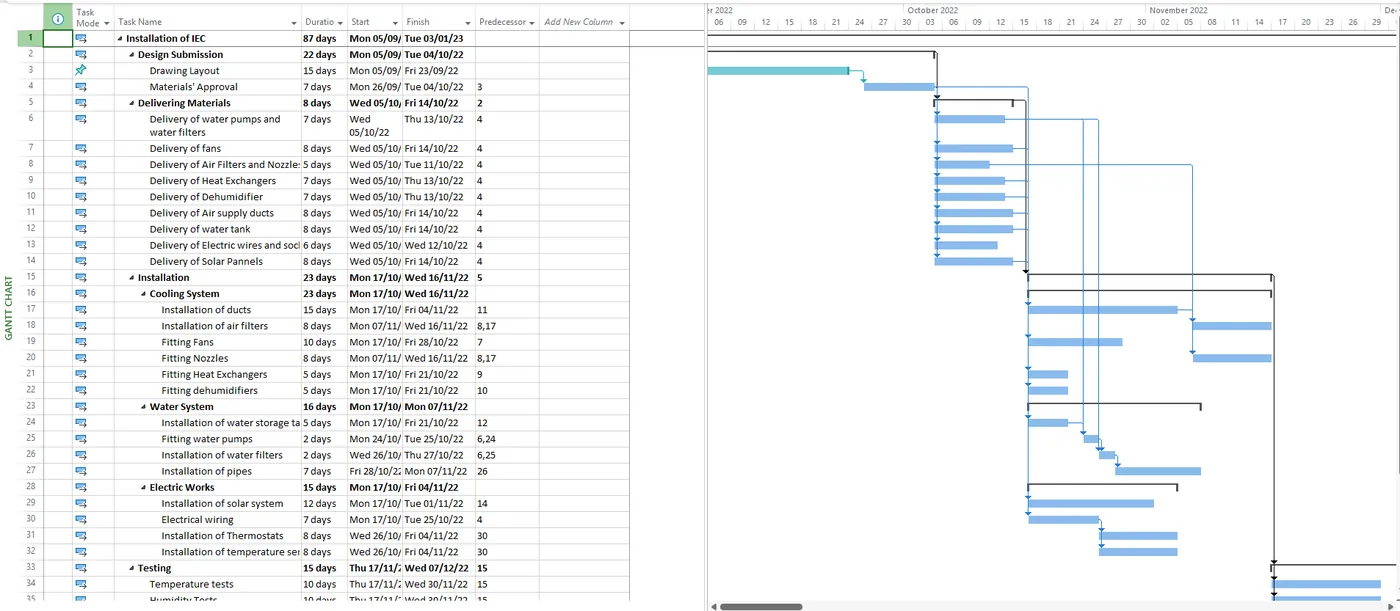
Start by estimating the activities identified during planning. Then look at their dependencies.
A dependency is a relationship between activities that affects when they can start or finish.
For example, a website cannot complete its final testing until the relevant features have been developed and made available for testing.
A simple project schedule might look like this:
| Project phase | Target period |
|---|---|
| Requirements and planning | Week 1 |
| Design and approvals | Weeks 2–3 |
| Development and configuration | Weeks 3–6 |
| Testing and corrections | Weeks 6–7 |
| Launch and handover | Week 8 |
Some activities may overlap. Developers might begin configuring the website while another design component is still being reviewed.
However, this depends on the technical requirements and the people available.
First, identify important milestones.
These might include requirements approval, design sign-off, completion of development, successful testing and final launch.
Second, check actual resource availability.
An activity requiring three working days of effort may take a week or longer if the employee responsible is also handling other projects or daily operations.
Third, consider the risks.
A critical supplier delivery, external approval or complicated software integration may introduce uncertainty. The schedule should account for realistic risks and dependencies.
For small projects, a spreadsheet or visual task board may be sufficient.
If the project involves more complex dependencies, several teams or detailed resource planning, tools such as Microsoft Project can provide additional scheduling capabilities.
A software development project, office renovation and marketing campaign won’t necessarily benefit from the same management approach.
The right choice depends on the type of work, how well the requirements are understood and how much change is expected during delivery.
A predictive approach involves planning much of the work in advance and managing delivery against the agreed plan.
It often suits projects with relatively stable requirements and clear sequences of activities.
Examples might include equipment installation, facility upgrades or certain engineering projects.
An adaptive approach allows a team to develop and review work in smaller increments.
This can be particularly useful in software development, where user feedback, technical discoveries and business priorities may lead to changes.
The Agile Manifesto places importance on collaboration, customer feedback and adapting to changing requirements.
Agile does not mean that the team stops planning. Planning still takes place, but it is regularly reviewed and updated as the team learns more.
Some projects benefit from combining predictive and adaptive practices.
For example, a company developing a new application may have an agreed overall budget, governance arrangements and target launch date while its development team works in short iterations.
The team can review completed features regularly and make decisions about what to develop next.
| Project characteristics | Approach to consider |
|---|---|
| Requirements are relatively stable, with predictable stages | Predictive |
| Requirements may evolve and frequent feedback is valuable | Adaptive |
| Some constraints are fixed while delivery details remain flexible | Hybrid |
These are useful starting points. The final choice should reflect the project itself.
The international standard ISO 21502:2020 recognises different delivery approaches, including predictive, adaptive and hybrid methods.
Spreadsheets, emails and messaging apps can work well when a team is small.
The problem usually appears when information becomes scattered. One person updates a spreadsheet, another shares a new deadline through email, and a third discusses the change in a chat group.
Soon, nobody knows which information is current.
A central project management platform can make tasks, responsibilities, deadlines and progress easier to see.
Here are some commonly used options:
| Tool | Where it may fit |
|---|---|
| ClickUp | Customisable workflows, task management, dashboards and automation |
| Asana | Team coordination, task ownership and project visibility |
| monday.com | Visual workflows, operational coordination and cross-team tracking |
| Jira | Software development, issue tracking and Agile delivery |
| Trello | Simple visual task management using Kanban-style boards |
| Smartsheet | Spreadsheet-style project tracking, reports and workflow management |
| Microsoft Project | Detailed project planning, dependencies and scheduling |
| Oracle Primavera P6 | Complex scheduling and project controls, particularly in engineering and construction |
There is no single best platform for every company.
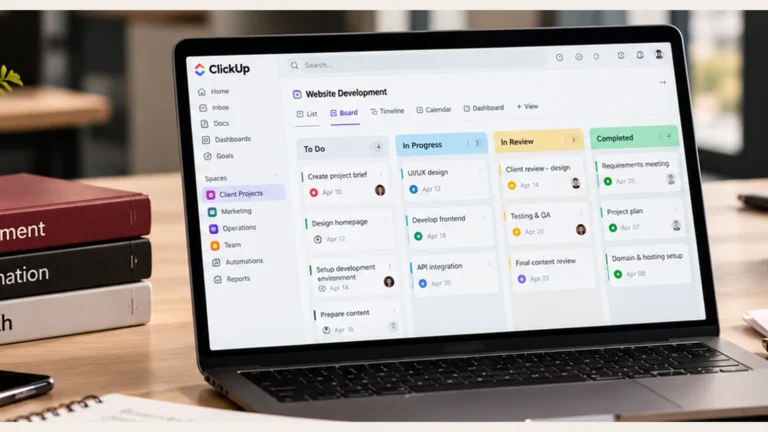
I work with ClickUp because its flexible structure allows workflows to be configured around different business processes. It can be particularly useful for managing client projects, responsibilities, recurring work and automated notifications.
However, it isn’t automatically the right choice for every organisation.
A software development team may prefer Jira, while a small agency may find Asana or ClickUp easier to adopt. A construction company managing complex schedules may need a more specialised planning tool.
Primavera P6, for example, can support sophisticated scheduling and project controls, but most small businesses will not need that level of complexity for routine work.
Consider how your business currently works:
It also helps to involve the employees who will use the software every day. A platform may look impressive during a demonstration but become frustrating if its workflow doesn’t fit the team’s actual work.
For many small teams, four task statuses are enough:
To Do → In Progress → In Review → Completed
A task might also become Blocked at any point.
Treat that as a separate flag or condition. When work becomes blocked, record the reason, the person responsible for resolving it and the next action.
Once the team is comfortable with the basic workflow, you can introduce templates, custom fields, dashboards and automated approvals.
From my experience, it is worth understanding the workflow properly before automating it. Otherwise, automation can simply move poorly defined work through the system more quickly.
For businesses that need help selecting and implementing a suitable platform, KAFA Consultancy’s project management and automation services cover workflow design, project planning and digitalisation.
A software integration might fail during testing. A supplier could miss an important delivery date. An employee with specialist knowledge may become unavailable.
These situations can affect even relatively small projects.
A simple risk management process helps the team identify possible problems and decide how to respond.
Start by asking:
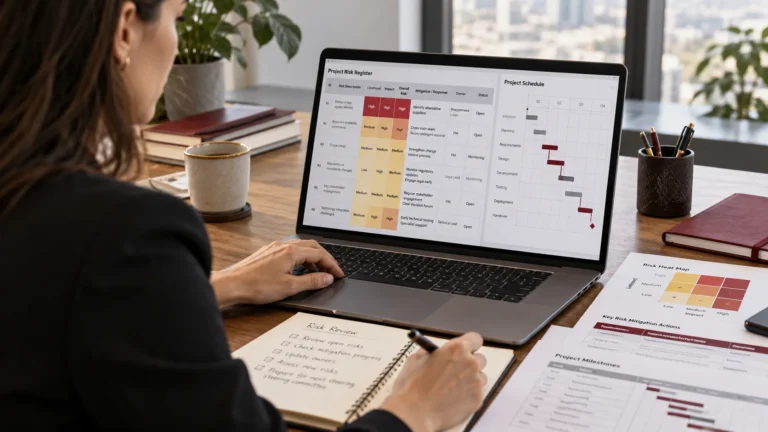
Record important risks in a risk register.
| Risk | Likelihood | Impact | Planned response |
|---|---|---|---|
| Product information arrives late | High | Medium | Agree deadlines and escalate missing information early |
| Payment integration fails testing | Medium | High | Test the integration before the final launch period |
| Project coordinator becomes unavailable | Low | High | Record key decisions and appoint temporary cover |
Assign an owner to each significant risk and review the register during regular project meetings.
You can start with simple High, Medium and Low assessments. Larger or more complex projects may require a more detailed approach.
A risk is something uncertain that may affect the project.
An issue is something that has already happened and needs attention.
For example:
An issue may require immediate corrective action, while a risk may call for monitoring or a planned response.
For further reading, ISO 31000:2018 provides internationally recognised guidance on managing risk in organisations.
Changes are part of project delivery, especially in software and digital projects.
A client may request an additional feature. Management might change priorities. Testing may reveal that the original solution needs to be improved.
Some changes are necessary and beneficial.
The difficulty comes when the team accepts additional work without checking how it affects the agreed schedule, budget and scope.
Imagine our online store is halfway through development when the business owner asks for a customer loyalty programme.
Before approving the request, the project coordinator needs to understand:
A simple change log can help.
| Change request | Schedule impact | Cost impact | Decision |
|---|---|---|---|
| Add loyalty programme | Estimated additional 2 weeks | Additional £1,500 | Pending approval |
These figures are hypothetical, but the process is widely applicable.
For a small project, change control can be as simple as documenting the request, checking its impact and obtaining written approval before proceeding.
Projects using Agile approaches may manage changes through backlog prioritisation and regular planning. Even then, teams must understand the effect of changes on budgets, commitments and delivery expectations.
Having an agreed approval process makes these conversations easier.
Once the project starts, managers need reliable information about progress.
For many small teams, a short weekly project review is a useful starting point.
The meeting doesn’t have to be long. It should help people understand what’s happening and resolve anything that could affect delivery.
Five questions can guide the discussion:
A basic dashboard can support these reviews.
| Indicator | What it tells you |
|---|---|
| Milestones achieved | Whether key delivery checkpoints are being met |
| Overdue tasks | Which activities need attention |
| Budget used against approved budget | Whether expenditure is within agreed limits |
| Open risks and issues | What needs monitoring or action |
| Pending approvals | Which decisions may be delaying progress |
Dashboards become particularly valuable when a business manages several projects simultaneously.
Instead of contacting different team members for updates, managers can see the latest information in one place.
The quality of that information matters. An attractive dashboard filled with outdated task statuses won’t help anyone manage the project.
Agree who is responsible for updating progress and how often it needs to be reviewed.
Small teams often finish the main work and immediately move on to the next assignment.
That can leave important loose ends.
A website may have launched, but some defects remain unresolved. A software system might be working, but nobody has been assigned responsibility for ongoing administration.
Before closing a project, make sure:
A short project review can be enough.
Ask the team what worked well, what caused difficulties and what could be improved next time.
If client approvals repeatedly caused delays, perhaps future projects need clearer approval deadlines. If tasks were regularly underestimated, the team may need to improve its estimating approach.
Use these lessons to update your templates, workflows and planning practices.
Over time, this helps the business develop a more consistent way of delivering projects.
Let’s consider a small digital agency with eight employees and several active clients.
The team provides website development, digital marketing and ongoing support services.
Different employees maintain their own task lists. Client requests arrive through email and WhatsApp. Deadlines are recorded in spreadsheets, and managers spend a considerable amount of time requesting updates.
The agency wants to improve project visibility and coordination.
Here’s how I would approach the setup.
First, I would look at how the agency handles a typical project, from receiving a client enquiry through planning, execution, approval and delivery.
This helps identify problems such as unclear handovers, repeated work, missing information and delayed approvals.
Next, I would introduce standard workflows for services the agency delivers regularly.
For example, a website development template might include requirements, design, development, testing, approval and launch.
These stages would be adapted to each client’s requirements rather than copied without review.
The team could then move its active project information into a suitable platform such as ClickUp or Asana.
Each project would have its own tasks, owners, deadlines and supporting documents.
Managers would be able to check progress without repeatedly asking employees for updates.
A short weekly review would help the agency identify overdue tasks, upcoming milestones, resource conflicts and decisions waiting for client approval.
Once the process is working, repetitive actions could be automated.
For example, a completed design task might notify the person responsible for approval. A new client project could be created from a template, and overdue tasks could trigger reminders.
Before implementing the changes, I would establish a few baseline measurements.
We could then compare:
That would tell us whether the new system was actually improving project delivery.
This is a hypothetical business scenario showing how the framework could be applied.
Introducing project management doesn’t mean changing every business process overnight.
For a small team, a four-week pilot can be a sensible starting point.
| Week | Main activity | Expected result |
|---|---|---|
| Week 1: Understand | Review current projects, identify problems and map existing workflows | Process map and improvement priorities |
| Week 2: Design | Define responsibilities, tasks, approvals, reporting and standard workflows | Agreed project process and templates |
| Week 3: Implement | Configure the selected platform, introduce real tasks and train the team | Working pilot |
| Week 4: Review | Test the system, gather feedback and make improvements | Refined workflow and rollout plan |
After the pilot, the business can expand the system to additional projects or departments.
More complex implementations may require additional planning, integrations, training and organisational change support.
Some project management improvements fail because the business introduces processes that employees find difficult to maintain.
A few mistakes are particularly worth watching for.
Choosing software too early. Understand how work currently happens and what needs improving before committing to a platform.
Setting unrealistic deadlines. Check estimates, dependencies and resource availability before promising completion dates.
Leaving ownership unclear. Tasks and important decisions need identifiable owners.
Ignoring changes. Small requests can gradually increase scope, cost and workload if nobody reviews their impact.
Introducing too much at once. Start with the most useful practices and expand as the team becomes comfortable.
Measuring activity rather than progress. Completing many tasks doesn’t necessarily mean the project is moving towards its agreed objectives.
Failing to involve management. Employees are less likely to adopt a new process when business leaders continue using separate systems and informal methods.
Not every small business needs external project management support.
If your team handles a small number of straightforward projects, you may be able to introduce the practices in this guide yourself.
Professional support becomes more useful when projects are repeatedly delayed, responsibilities are unclear, multiple teams need coordination or existing tools are not meeting the business’s needs.
A project management consultant can help review current processes, develop realistic plans, establish suitable controls and support implementation.
This is particularly relevant when a business is growing quickly, adopting new software or managing projects that are becoming more complex.
It depends on your team, projects and reporting needs. ClickUp, Asana, monday.com and Trello are among the platforms worth evaluating for smaller teams. Businesses with more specialised requirements may need other tools.
Yes. A business owner, operations manager or team leader can coordinate projects, particularly when the work is relatively straightforward. Clear ownership and decision-making responsibilities are still important.
It can be, particularly when requirements change and frequent customer feedback is useful. However, some projects benefit more from predictive planning or a hybrid approach.
A practical starting point includes a project brief, deliverables list, task schedule, responsibility assignments, risk and issue register, change log and short progress report. These can be simplified or combined for smaller projects.
Costs depend on the platform, number of users, required features, integrations and training. Consider implementation and ongoing administration alongside subscription fees.
A straightforward workflow may be piloted within a few weeks. More complicated setups involving multiple departments, software integrations or major process changes can take considerably longer.
Task management focuses on assigning, organising and completing individual activities. Project management also considers the overall scope, schedule, resources, costs, risks, stakeholders and intended outcomes.
Good project management makes business operations easier to understand and manage.
A small business doesn’t need to adopt every recognised methodology or invest in expensive software from the beginning.
Start with one project. Agree on what needs to be delivered, break the work into manageable pieces, assign responsibilities and create a realistic schedule.
Make sure the team has a consistent way to report progress, manage risks and deal with changes.
Then improve the process as the business grows.
Whether you’re managing software development, client campaigns, engineering work or internal business improvements, these basic practices provide a useful foundation for more reliable project delivery.
At KAFA Consultancy, we help businesses improve how they plan, manage and deliver projects.
Our services include:
Whether you’re setting up project management for the first time or improving an existing process, we can help assess your requirements and develop an approach that fits your business.
Explore KAFA Consultancy’s Project Management & Automation Services
This guide draws on recognised project management principles and adapts them into a practical setup process for small businesses. The 10-step structure and hypothetical examples are not presented as an official PMI, APM or PRINCE2 methodology.
Learn project risk management with practical examples, a sample risk register and simple ways to identify, assess and control risks before they cause delays.
Read insightLearn how to digitalise project management workflows, reduce manual work and improve project visibility with practical steps, tools and automation examples.
Read insightLearn why projects fail and how to prevent 10 common causes, including scope creep, poor planning, weak communication, resource gaps and unmanaged risks.
Read insight