
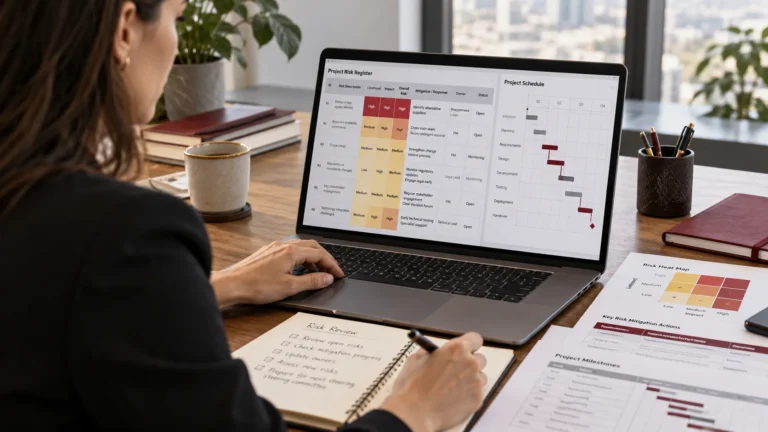
Project Risk Management: How to Identify, Assess and Control Risks
Learn project risk management with practical examples, a sample risk register and simple ways to identify, assess and control risks before they cause delays.
Read insightLearn how to digitalise project management workflows, reduce manual work and improve project visibility with practical steps, tools and automation examples.
A client asks for an update on their project. The project manager checks a spreadsheet, messages two team members and searches through emails to find the latest approval.
By the time the update is ready, half an hour has passed.
Now imagine this happening across ten or fifteen projects every week.
Many businesses still manage projects this way. Tasks are stored in spreadsheets, conversations happen on WhatsApp or Microsoft Teams, and important files are scattered across different folders. Each tool serves a purpose, but keeping everything connected takes effort.
As the business grows, this becomes harder to manage.
Project management workflow automation can help businesses reduce repetitive administration, improve project visibility and keep work moving between the right people.
But where should you start? And how do you move from manual project management to a digital workflow without disrupting the entire team?
In this guide, I’ll explain how to digitalise your project management workflows, choose suitable tools and introduce automation gradually. We’ll use examples from IT and digital agencies, although the same principles can be applied to engineering, construction and other businesses.
A project management workflow describes how work moves from one stage to another.
For example, a website development project might follow this process:
Client requirements → Planning → Design → Development → Testing → Client approval → Launch
Each stage involves tasks, people, information and decisions.
In a manual workflow, employees may use separate spreadsheets, emails and messages to manage these activities.
In a digital workflow, that information is organised in a shared system where authorised team members can track tasks, responsibilities, deadlines and progress.
The system might also automate routine actions, such as assigning tasks, sending reminders or notifying someone when work is ready for approval.
These terms are closely related, but they don’t mean exactly the same thing.
Digitalisation means using digital systems to improve how work is organised and carried out.
For example, replacing separate spreadsheets with a shared project workspace where employees can update tasks and view progress.
Workflow automation means configuring the system to perform certain actions when specific conditions are met.
For example, when a designer marks a task as ready for review, the system automatically assigns it to the account manager.
A workflow can be digital without being automated.
And that is often the right place to start.
The Project Management Institute’s Digital Transformation Playbook explains that successful digital transformation involves people, processes and organisational culture alongside technology.
Buying software is only one part of the work.
Before introducing a new project management platform, look at how work currently moves through your business.
Let’s take a small digital agency.
It provides website development, social media management and paid advertising services. The team uses spreadsheets to track deadlines, WhatsApp for internal communication and email for client approvals.
The arrangement works, but employees regularly encounter problems.
A designer finishes a creative, yet the account manager doesn’t know it is ready. A developer starts work using an outdated requirement. The project manager spends Friday afternoon collecting updates for the weekly report.
These are useful starting points for improvement.
Choose one common project type and follow it from beginning to end.
For example, a typical website project may involve:
At each stage, ask where the information is stored, who owns the work and what happens if a decision is delayed.
You may discover that the main issue is client approvals. Another business might find that resource allocation or unclear task ownership causes most of its problems.
Write these observations down before making changes.
It is also useful to ask employees what slows them down. They often know which steps are confusing or repetitive because they deal with them every day.
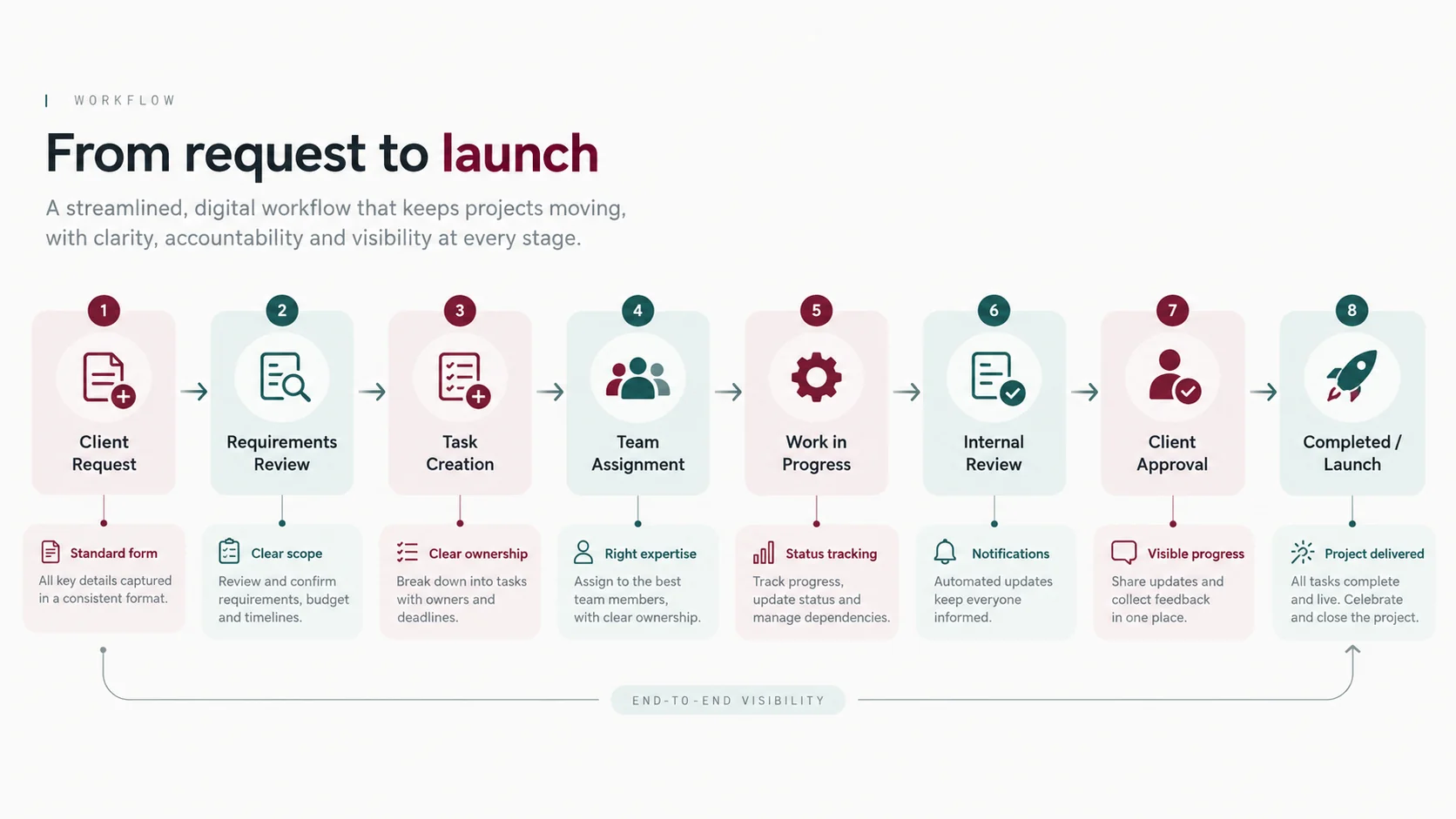
Once you understand the current process, decide how it should work.
For our digital agency example, we could create a standard workflow for handling website projects.
| Stage | Responsible person | Expected output |
|---|---|---|
| Requirements | Account manager | Approved requirements |
| Planning | Project manager | Schedule and task assignments |
| Design | Designer | Design ready for review |
| Approval | Client / account manager | Recorded design approval |
| Development | Developer | Completed website functionality |
| Testing | QA / project team | Tested deliverables |
| Launch | Project manager / technical team | Approved live website |
This gives everyone a clearer understanding of the process.
It also reveals where handovers occur.
For example, the account manager needs to know when a design is ready to share with the client. The developer needs to know when approved designs are available.
Those are possible opportunities for automation later.
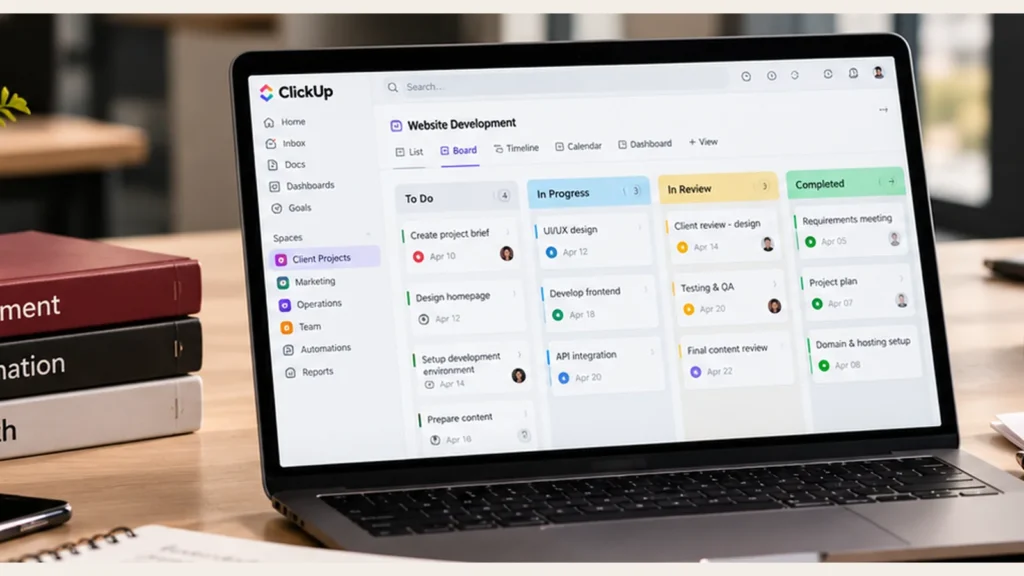
A small team may only need four main statuses:
To Do → In Progress → In Review → Completed
Tasks that cannot proceed can be marked Blocked or Waiting for Approval, depending on how the workflow is configured.
The important part is agreeing what each status means.
For example, In Review should indicate who is reviewing the work and what must happen before it can be completed.
Without clear rules, different employees may use the same statuses in different ways.
Once the workflow is defined, it becomes easier to evaluate software.
There are several established platforms that support digital project management.
| Platform | Common applications |
|---|---|
| ClickUp | Custom workflows, task tracking, project dashboards and automation |
| Asana | Team coordination, project visibility and workflow management |
| monday.com | Visual project tracking and business process workflows |
| Jira | Software development, issue tracking and Agile project delivery |
| Microsoft Project | Detailed planning, scheduling and dependencies |
| Smartsheet | Spreadsheet-style project tracking, reporting and workflow management |
Each has different strengths.
For example, a software company already working in Jira may benefit from improving its existing processes rather than migrating everything to another platform.
A digital agency might prefer ClickUp, Asana or monday.com for coordinating several client services.
An engineering company with complex scheduling requirements may need Microsoft Project or specialist planning software alongside its collaboration tools.
I would assess the platforms against a few practical requirements:
Also consider the total cost of implementation.
Subscriptions are only part of the expense. Configuration, data migration, integrations and staff training may require additional time and resources.
If your company already has a platform, review whether it can meet your requirements before paying for another one.
Now it’s time to set up the system.
You don’t need to migrate every historical project immediately.
I would begin with one active project or a small group of similar projects.
Create the main project structure, add tasks and assign responsibilities.
For example, a digital agency using ClickUp might organise its workspace like this:
Workspace: Digital Agency
This is one possible structure. Agencies organised around departments may prefer a different approach.
Within each project, tasks should contain the information needed to carry out the work.
A task such as Design homepage might include the approved requirements, design references, assigned designer, deadline and review contact.
Before moving information between systems, identify which records are current and which are no longer needed.
Check that task owners, deadlines, attachments and important decisions are transferred correctly.
You should also review access permissions.
Client documents, employee information and confidential project files should only be visible to people who are authorised to access them.
For some businesses, data protection obligations, client contracts and organisational security requirements will affect the tools and storage arrangements they can use.
Test the new workspace with a small group before moving the entire team.
Once employees are using the digital workflow consistently, look for repetitive actions that can be automated.
These might include assigning work, reminding reviewers, creating recurring tasks or notifying project managers when important milestones are reached.
Most modern workflow platforms provide some automation capabilities, although the available features and limits vary by subscription.
For example, ClickUp Automations use triggers, optional conditions and actions.
A trigger starts the automation. A condition checks whether certain requirements are met. An action tells the system what to do.
| Manual process | Possible automation |
|---|---|
| Project manager assigns every review task manually | Assign a reviewer when a task reaches the review stage |
| Account manager repeatedly checks for completed designs | Notify the account manager when design work is ready |
| Team creates the same monthly tasks | Generate recurring tasks or apply approved templates |
| Employees forget to update upcoming work | Send reminders before agreed due dates |
| New client requests arrive in different places | Use a standard request form to create tasks |
| Managers chase approval updates | Notify the appropriate person when an approval is pending |
These examples show possible workflows. The exact configuration depends on the chosen software.
Some actions should still require human approval.
For example, a client requests additional work that will increase the project cost.
The system can record the request and notify the project manager. It can also route the request to the authorised person.
However, approving the additional budget may require a commercial decision.
Automation works best when the rules are clear and the team knows how to handle exceptions.
I would test each new automation using a sample project before enabling it across the business.
One of the biggest reasons businesses adopt digital project management systems is to gain better visibility.
Imagine an operations manager supervising twelve active projects.
Without a shared system, they may need to contact several employees to find out which projects are delayed and where support is required.
A project dashboard can make this information easier to access.
For example:
| Dashboard indicator | What it shows |
|---|---|
| Active projects | Current delivery workload |
| Upcoming milestones | Important deadlines approaching |
| Overdue tasks | Activities requiring attention |
| Tasks waiting for approval | Possible decision bottlenecks |
| Resource workload | Where employees may be overloaded |
| Open risks and issues | Problems requiring monitoring or action |
The information should be updated as part of normal project work.
A dashboard cannot provide an accurate picture if employees aren’t maintaining task statuses or recording important decisions.
For smaller businesses, I would keep the reporting simple at first.
Management should be able to identify where projects need attention without sorting through unnecessary charts.
Introducing a digital workflow changes how employees work.
People may be comfortable with spreadsheets or existing communication channels. Some may see the new platform as extra administration.
This is why team involvement and training matter.
Explain what is changing and why.
For example, employees might be asked to update tasks in ClickUp rather than sending individual status messages to the project manager.
Show them how this will reduce repeated requests for information and make responsibilities easier to follow.
Start with a pilot team.
Provide short training sessions using real examples from their daily work.
Make sure employees understand:
Collect feedback during the first few weeks.
The Association for Project Management’s guidance on preparing for change highlights the importance of stakeholder support, transition planning, knowledge transfer and helping new practices become part of business operations.
You may need to adjust the workflow after seeing how employees use it.
That is normal. A pilot is an opportunity to improve the setup before introducing it more widely.
Consider a marketing agency with ten employees and several ongoing client accounts.
The team manages advertising campaigns, creative production and website projects.
Before digitalisation, project information is stored across spreadsheets and chat messages.
The agency’s main problems are delayed approvals, unclear task ownership and time spent preparing weekly progress reports.
Here’s how I would approach the improvement.
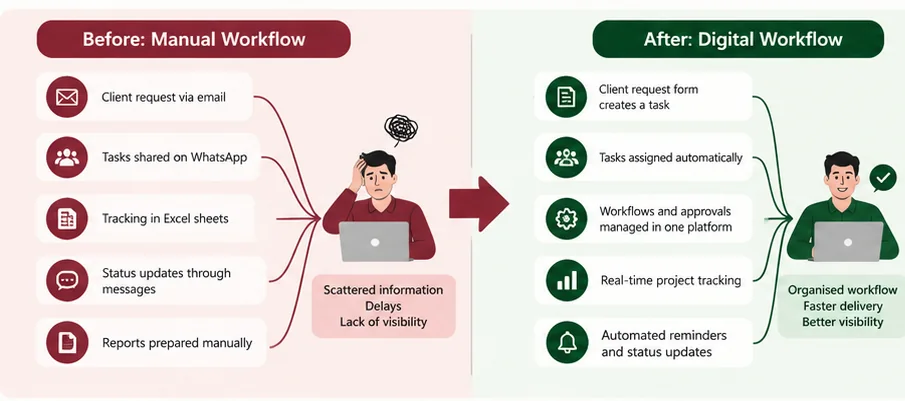
A client asks for new advertising creatives.
The account manager forwards the request to a designer through WhatsApp. The designer prepares the graphics and sends them back in the same conversation.
The account manager emails the files to the client and waits for feedback.
Meanwhile, the project manager doesn’t have a clear record of when the request began, who is responsible or whether the client has approved the work.
The agency introduces a structured creative request process.
The project manager can now see which requests are in progress, waiting for approval or overdue.
The team also has a clearer record of the work completed and the decisions made.
This is a hypothetical example of a workflow implementation, rather than a claim about a specific client result.
Moving work into new software is not enough to show improvement.
Before changing the process, identify what you want to achieve and how you will measure it.
For example, the agency above might measure:
| Metric | What to compare |
|---|---|
| Time spent preparing project reports | Before and after implementation |
| Average client approval time | Days taken to receive decisions |
| Overdue tasks | Number of tasks late each month |
| On-time project delivery | Percentage completed by agreed deadlines |
| Time spent on routine administration | Hours spent assigning tasks and chasing updates |
| Employee adoption | Whether the team consistently uses the new system |
Some benefits may appear quickly. Others may take longer as employees adapt.
APM’s guidance on benefits management explains why organisations should identify expected benefits and monitor whether they are actually realised.
For example, if the main objective was to reduce project reporting time, measure that rather than simply counting how many automations have been created.
If results don’t improve, investigate the cause.
Perhaps the system is too complicated, employees need additional training, or the original workflow problem hasn’t been addressed.
You don’t have to change the entire organisation at once.
For a small business, a four-week pilot can be a sensible starting point.
| Week | Focus | Main activities |
|---|---|---|
| Week 1 | Understand | Map the current process and identify problems |
| Week 2 | Design | Define workflow stages, responsibilities and reporting needs |
| Week 3 | Implement | Configure the tool, migrate selected tasks and train users |
| Week 4 | Review | Test the workflow, gather feedback and introduce selected automations |
At the end of the pilot, review whether the system is practical for the team.
If it is working, expand it to other projects or departments.
Businesses with complex integrations, large teams or strict regulatory requirements may need a longer implementation programme.
Several problems can reduce the value of a digital workflow.
Moving a poor process into new software. Map the workflow first and address unnecessary steps before configuring the system.
Introducing too many features. Employees may struggle if they are expected to learn complex dashboards, custom fields and automations immediately.
Keeping multiple versions of the same project information. Agree on which platform holds the official task status, documents and decisions.
Automating unclear responsibilities. An automated notification won’t solve a problem if nobody knows who has authority to approve the work.
Ignoring team training. Employees need to understand both the software and the process they are expected to follow.
Failing to measure results. Without baseline measurements, it is difficult to know whether the new workflow has improved delivery.
Smaller businesses with straightforward requirements may be able to set up a digital workflow themselves.
However, professional support can be useful when several teams need to work together, project information is scattered across multiple systems or the organisation needs more complicated automations and integrations.
A project management consultant can help map the existing process, identify improvement opportunities, configure the selected tools and support employees during the transition.
This can also be valuable when a company has already purchased project management software but is not getting much benefit from it.
It is a structured process for managing project tasks, information, approvals and progress through digital tools. It provides a shared way for team members to coordinate work.
Digitalisation uses digital systems to improve how work is organised and managed. Automation enables certain actions to happen automatically based on defined triggers and rules.
The answer depends on the business. ClickUp, Asana, monday.com and Jira are among the platforms worth evaluating. Compare their workflow capabilities, integrations, reporting, permissions and overall cost.
Yes. A small business can begin with one project, a simple task structure and clear responsibilities. More advanced automation can be introduced as the team becomes comfortable with the new process.
A straightforward workflow may be piloted in a few weeks. Larger implementations involving several teams, integrations or organisational changes can take considerably longer.
Digitalising project management workflows can make a real difference to how a business coordinates work.
Start by looking at the problems employees face every day. Find out where information gets lost, which approvals cause delays and how managers currently track progress.
Then design a clearer process and choose tools that support it.
Begin with a small pilot, involve the team and introduce automation where it can reduce repetitive work.
Measure the results and keep improving the system.
Whether you’re managing software development, digital marketing projects, engineering work or internal business operations, a well-organised digital workflow can help your team work with greater clarity and consistency.
At KAFA Consultancy, we help businesses improve project management processes and implement digital workflows that support day-to-day operations.
Our services include:
Whether you’re introducing a project management system for the first time or improving an existing setup, we can help assess your requirements and develop an appropriate approach.
Explore KAFA Consultancy’s Project Management & Automation Services
Project Management Institute (PMI). (2023). The Digital Transformation Playbook, Second Edition. A PMI practice guide examining technology, people, processes and organisational change. Official PMI resource.
Association for Project Management (APM). Preparing for Change — APM Competence Framework. Guidance on transition management, stakeholder involvement, training and benefits. Official APM resource.
Association for Project Management (APM). What Is Benefits Management and Project Success? Official APM resource.
Project Management Institute (PMI). A Guide to the Project Management Body of Knowledge (PMBOK® Guide), Eighth Edition. Official PMI resource.
ClickUp. Intro to Automations. Official documentation covering automation triggers, conditions and actions. ClickUp Help Centre.
ClickUp. Automations Feature Availability and Limits. Official guidance on plan-related automation capabilities. ClickUp Help Centre.
Learn project risk management with practical examples, a sample risk register and simple ways to identify, assess and control risks before they cause delays.
Read insightLearn why projects fail and how to prevent 10 common causes, including scope creep, poor planning, weak communication, resource gaps and unmanaged risks.
Read insightSet up project management for your small business with 10 practical steps covering project planning, responsibilities, scheduling, risks, software and workflow automation.
Read insight